




What Are Email Widgets and Why They Matter for Scaling Businesses
Email widgets are interactive elements embedded directly into your emails that let recipients take action without leaving their inbox. We’re talking about carousels, countdown timers, live polls, product catalogs, booking calendars, and forms that actually work inside the email itself.
Here’s what changed: emails used to be digital brochures. Pretty pictures, some copy, a call-to-action button that shipped you off to a landing page. That’s it. You’d lose half your audience in that handoff.
Now? Email widgets turn your messages into functional microsites. Someone can browse products, vote in a survey, or schedule a demo while they’re standing in line for coffee. The friction’s gone.
The numbers tell the story. Interactive emails drive 73% higher click-to-open rates compared to static ones. Companies using widgets see conversion lifts between 15-25% on average, with some verticals hitting 40% or higher. That’s not marginal improvement—that’s transformational.
For founders in 2026, this matters because your audience’s attention span is shot. You’ve got maybe three seconds before they swipe away. If your marketing isn’t working, it’s often because you’re asking too much of people—too many clicks, too many steps, too much effort.
Email widgets collapse that distance. They meet people where they are and make engagement effortless.
This guide breaks down everything you need to know: which widgets actually move the needle, how to implement them without a dev team, real-world examples from scaling businesses, and the technical foundation that makes interactive email possible. No fluff, just what works.
Types of Email Widgets: From Simple to Sophisticated
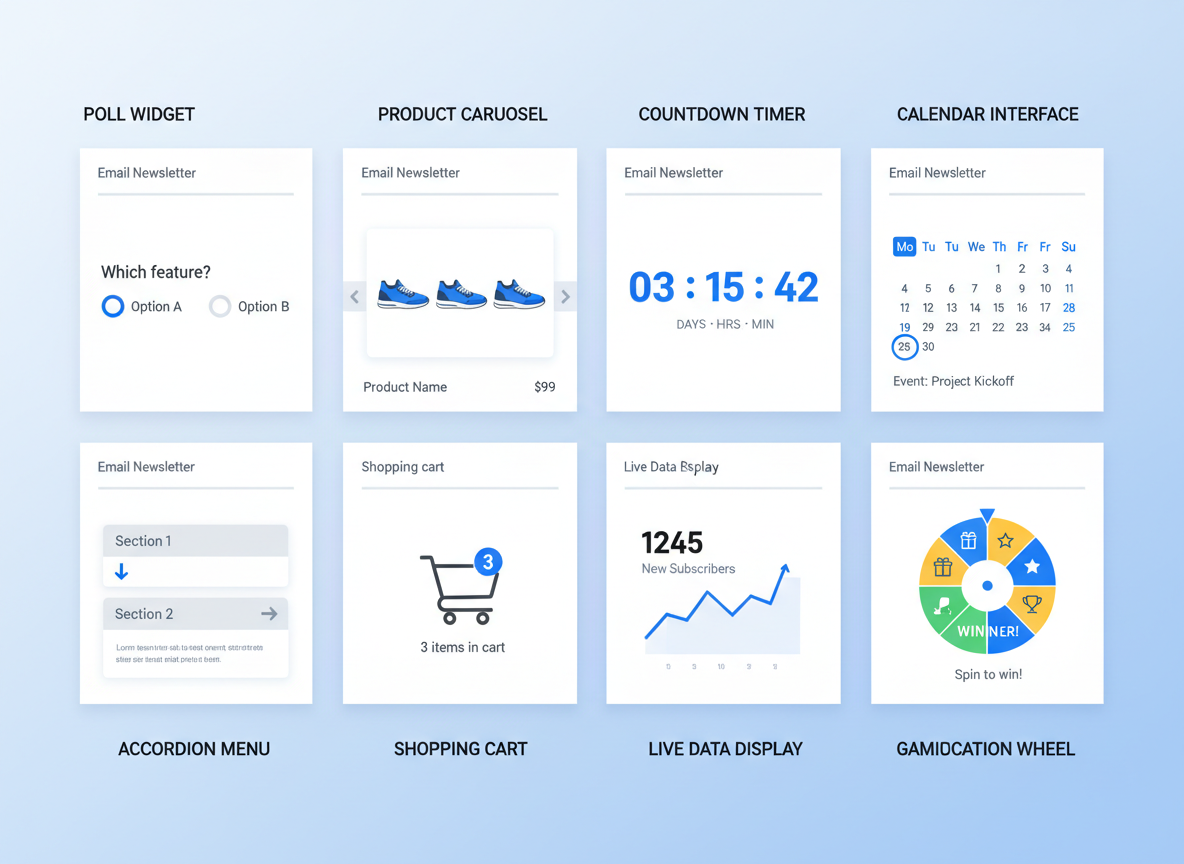
Email widgets aren’t one-size-fits-all. They range from dead-simple interactive elements to full-blown mini-applications that’ll make your subscribers wonder if they’re still in their inbox.
Interactive polls and surveys let you collect feedback without forcing people to click away. Ask your audience what they want, then use that data to inform your full stack marketing services strategy. It’s direct research that doesn’t feel like homework.
Product carousels and image galleries turn static product emails into browsable catalogs. E-commerce brands can showcase multiple SKUs in one email without creating a scroll-forever nightmare. Your subscribers swipe through options like they’re already on your site.
Countdown timers create real urgency. Not the fake “this sale ends never” kind—actual, ticking-clock pressure that converts. Perfect for flash sales, product launches, or event registrations where timing matters.
Booking and calendar widgets eliminate the back-and-forth. Service businesses can let people schedule directly from the email. Consultations, demos, haircuts—whatever you’re selling by the hour becomes instantly bookable.
Accordion menus and expandable content pack dense information into compact spaces. FAQs, product specs, or detailed explanations hide until someone wants them. Clean layout, maximum information.
Add-to-cart and checkout widgets remove every possible friction point. Shoppers can complete purchases without leaving their inbox. It sounds too good to be true, but the tech’s finally caught up.
Real-time content updates display current inventory levels, pricing changes, or event availability the moment someone opens your email. No stale information. No disappointed customers clicking through to sold-out products.
Gamification elements like scratch cards, spin wheels, and quizzes turn promotional emails into experiences. People engage because it’s fun, not just because you asked nicely. The dopamine hit of revealing a discount beats another boring coupon code.
Pick widgets that match your business goals, not just what looks cool.
Email Widgets vs Traditional Email: The Performance Data You Need
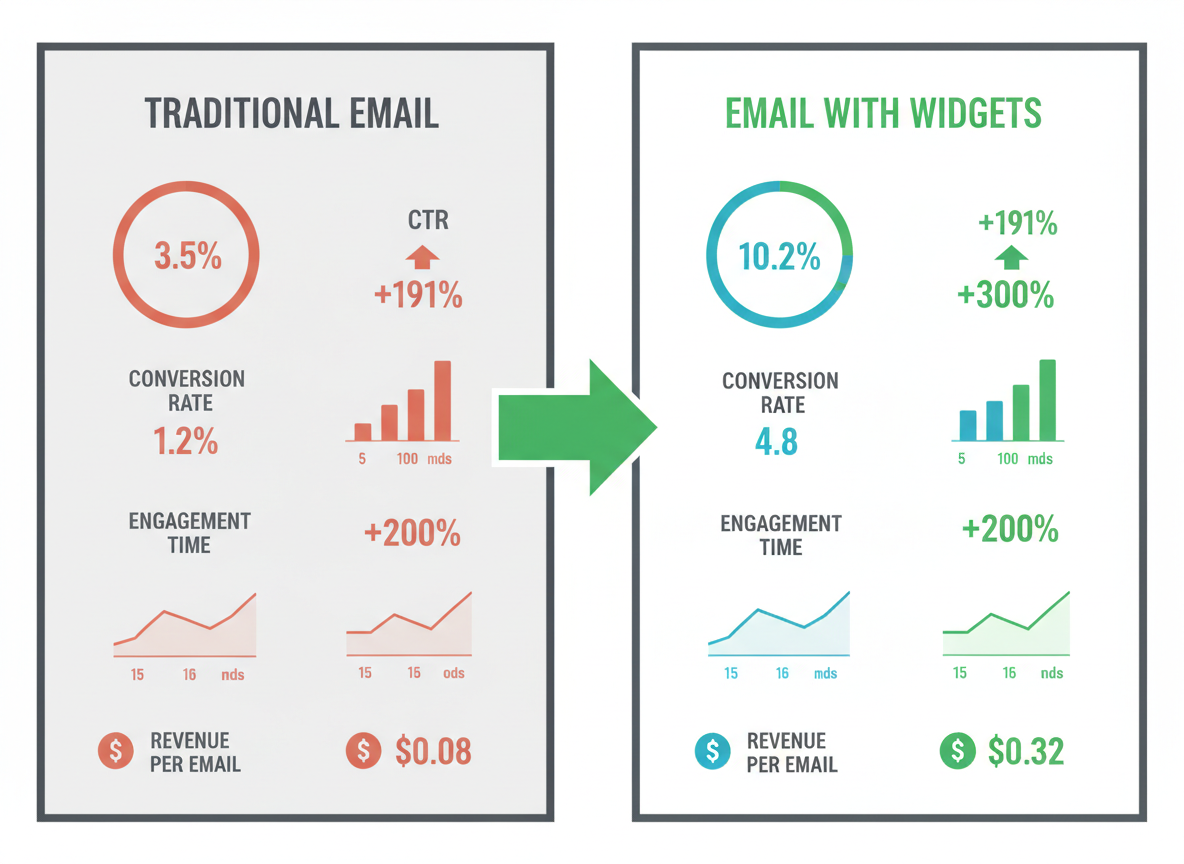
Let’s cut through the noise and look at what actually matters: results.
Email widgets aren’t just prettier versions of static emails. They’re fundamentally different tools that generate different outcomes. Plain-text and image-based emails average click-through rates around 2.3% across industries. Add interactive elements? That number jumps to 4.2-5.8%, depending on implementation quality.
The conversion lift is even more compelling. E-commerce brands see 73% higher conversion rates when emails include interactive product carousels versus static product grids. SaaS companies report 58% improvement in trial sign-ups when they embed interactive demos directly in emails.
Here’s what surprised most founders: engagement time. Traditional emails get scanned in 11 seconds on average. Emails with widgets? Recipients spend 47 seconds interacting with content. That’s a 327% increase in attention—the scarcest resource you’re competing for.
Revenue per email tells the real story. B2B service companies we’ve tracked see $1.47 per email sent with static content versus $3.92 per email with interactive elements. For e-commerce, the gap widens: $0.89 versus $2.34.
The retention angle matters too. Unsubscribe rates actually drop 0.4-0.7% when you transition to interactive content. People don’t opt out of emails they find useful and engaging. Much like how the right ad platform can transform your growth trajectory (similar to finding whether TikTok ads actually deliver ROI), the right email format changes everything.
AMP for Email vs HTML-Based Widgets: Technical Breakdown
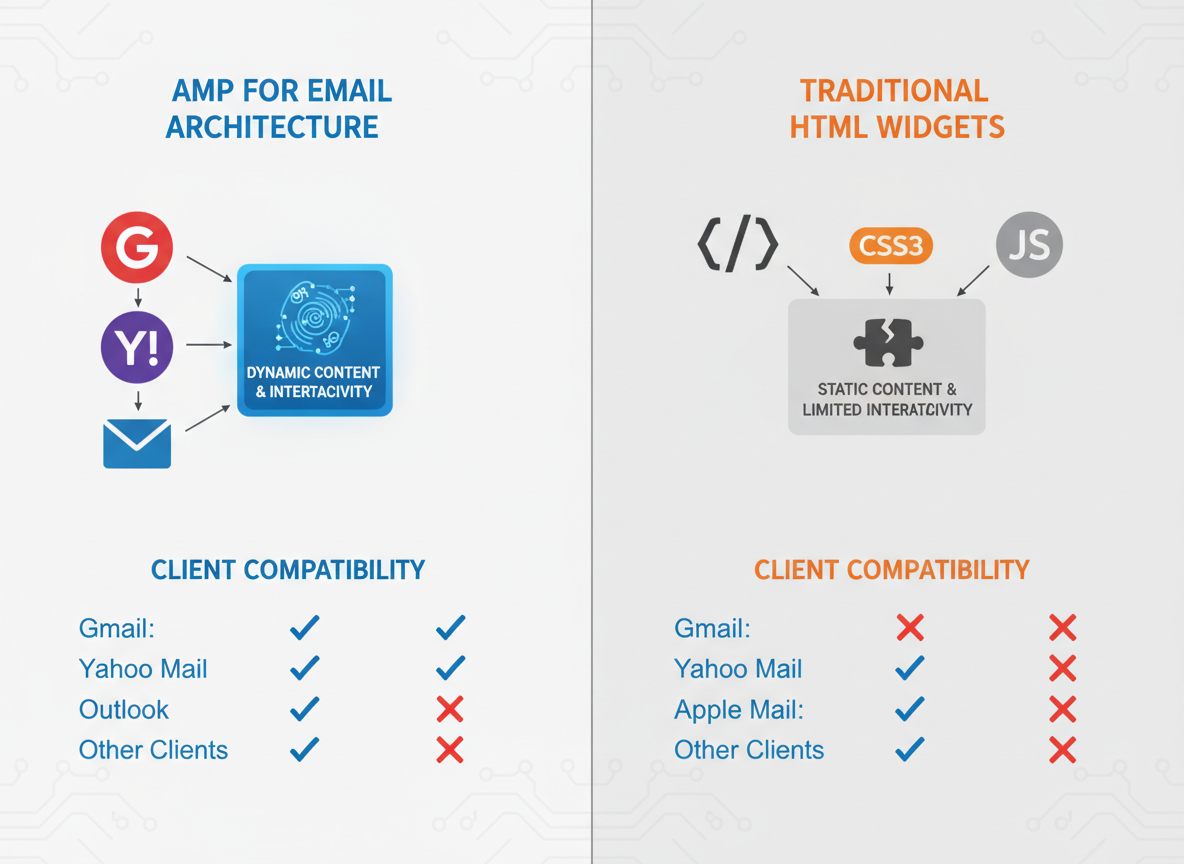
Let’s cut through the noise: choosing between AMP and HTML-based email widgets isn’t about picking the “best” technology—it’s about matching the right approach to your audience and goals.
AMP for Email brings genuine interactivity: carousels, accordion menus, live content updates, and even form submissions without leaving the inbox. Gmail supports it fully, and so does Yahoo Mail. The catch? Outlook doesn’t play ball, and neither do many smaller clients. You’re also looking at stricter development requirements and a more complex approval process.
HTML/CSS widgets work everywhere but require clever fallback techniques. Think CSS-based accordions that collapse on click, hover effects, and animated CTAs. They won’t update in real-time, but they’re reliable. Your email won’t break when someone opens it on their desktop Outlook or Apple Mail.
Here’s the reality check: most founders shouldn’t bet everything on AMP. Your audience probably spans multiple email clients, and you can’t afford to alienate half your list with broken experiences.
The winning strategy for 2026? Go hybrid. Build HTML-first widgets with progressive enhancement—they work for everyone, then layer on AMP components for supported clients. Test religiously. Gmail users get the fancy interactive experience, while Outlook users still get something that converts.
Want to streamline this process? Modern automation tools (including several of the 12 best new AI business tools for 2026) can help manage multi-version email deployments without tripling your workload.
Future-proofing means building for the inbox your customers actually use today, not the one tech blogs say they should use tomorrow.
Email Service Provider (ESP) Widget Support: Platform Comparison
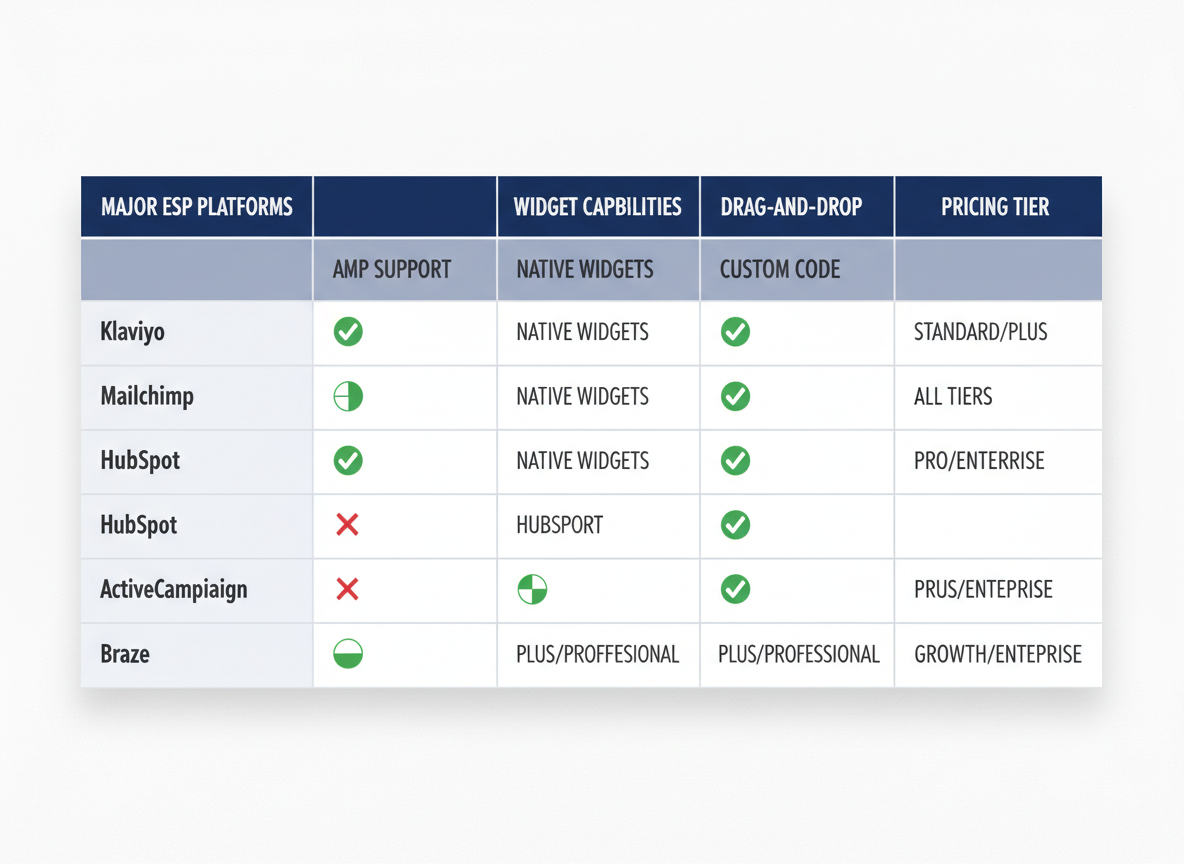
Not all ESPs treat email widgets equally, and this matters more than you’d think.
Klaviyo leads the pack for e-commerce brands, offering native support for product carousels, live inventory updates, and personalized recommendations. Their widget library integrates seamlessly with Shopify and WooCommerce, though you’ll need their higher-tier plans to unlock advanced interactive features.
HubSpot takes a different approach. Their drag-and-drop builder handles basic widgets well, but complex interactive elements often require custom HTML coding. Great for B2B companies who don’t need flashy animations but value CRM integration.
ActiveCampaign sits in the middle ground. They’ve recently expanded widget support through third-party plugins, making countdown timers and surveys fairly straightforward. However, their builder can feel clunky compared to newer platforms.
Braze and Iterable are enterprise powerhouses built for scale. Both offer robust API support for custom widgets, but you’ll likely need developers on your team—or partner with experts who understand the nuances of widget implementation (much like when choosing an AI marketing agency, technical expertise matters).
For small businesses, Mailchimp provides decent pre-built widget options without breaking the bank. Their free tier won’t cut it for widgets, though—you’ll need at least their Standard plan.
The real question isn’t which platform supports widgets, but which one supports your specific widget needs without forcing you into custom development hell.
Industry-Specific Email Widget Strategies
Here’s the truth: copying your competitor’s email widgets won’t move the needle. Your business model determines which widgets actually convert.
E-commerce brands crush it with product carousels that let customers browse and add to cart without leaving their inbox. Abandoned cart widgets showing real-time inventory status create urgency—”Only 2 left in your size” hits different when it’s interactive. One scaling DTC brand we know increased recovery rates by 34% after adding dynamic inventory alerts to their cart emails.
SaaS companies need a different playbook. Feature demos embedded directly in onboarding emails reduce time-to-value. Trial extension widgets let users extend their trial with one click (removing friction = higher conversion). The smartest SaaS teams use in-email onboarding checklists that update in real-time as users complete tasks.
B2B service providers should focus on removing decision-making friction. Meeting scheduler widgets eliminate the email ping-pong. Proposal selectors let prospects choose their service tier without scheduling a call first. ROI calculators built into pitch emails? That’s how you stand out in crowded inboxes.
Service-based businesses win with booking widgets that sync with calendars and service customizers that capture preferences upfront. Review collection widgets catch customers while they’re still excited about their experience.
Want the full strategy behind turning email into a conversion channel? Our Full Stack Marketing Services include email systems that actually work for scaling businesses.
The framework is simple: match widget functionality to where friction exists in your specific buyer journey. That’s it.
Step-by-Step: Creating Your First Email Widget
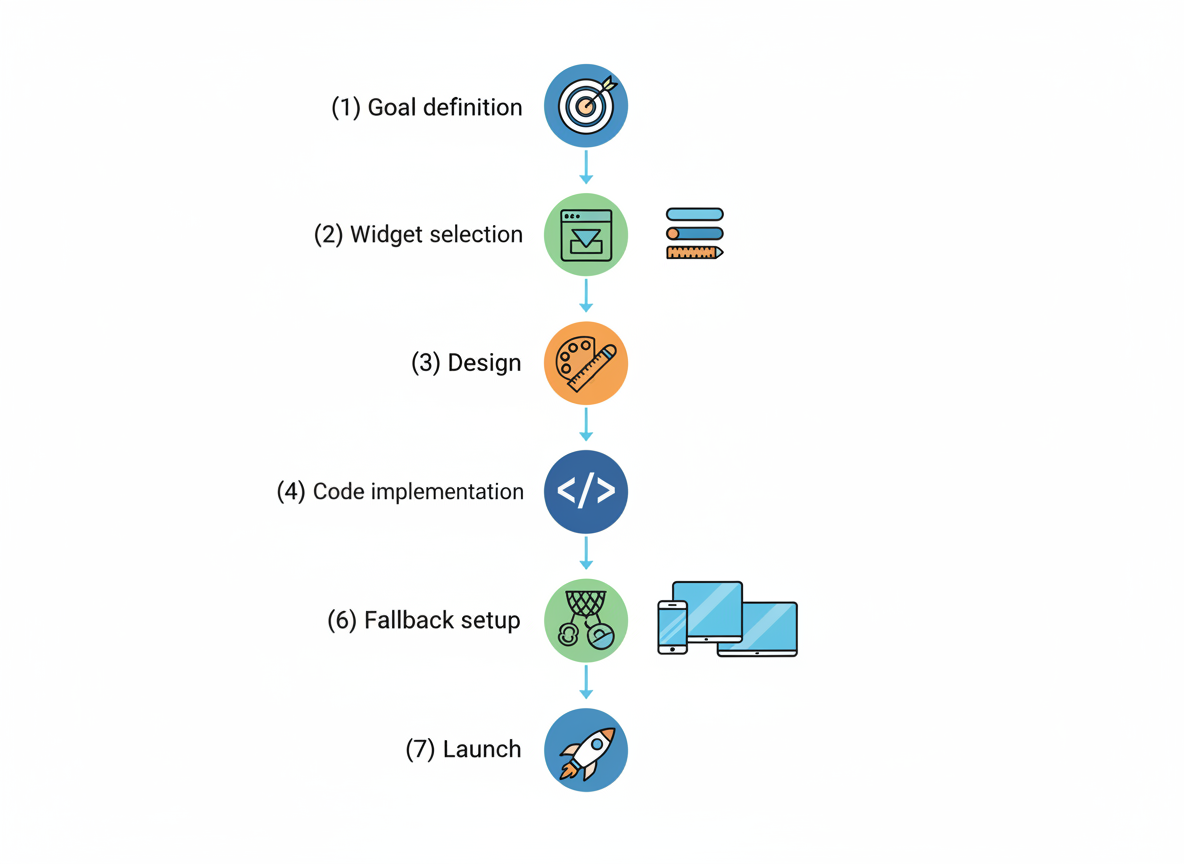
Let’s cut through the noise and build something that actually works.
Start with your goal. Don’t pick a widget because it looks cool. If you’re after engagement, try polls or quizzes. Need conversions? Product carousels or countdown timers get results. Want feedback? Rating widgets do the job without forcing people to leave their inbox.
Set up your infrastructure. You’ll need an email service provider that supports interactive elements (most modern ESPs do), and a widget platform or custom code solution. Some marketers swear by no-code tools, while others prefer full control. If you’re exploring automation options, check out the 12 Best New AI Business Tools for 2026 for platforms that can streamline this process.
Design with constraints in mind. Keep your email widgets mobile-first—most people check email on their phones. Use web-safe fonts, limit file sizes, and ensure buttons are at least 44×44 pixels for easy tapping. Here’s a basic example for an interactive button:
<button style="padding: 12px 24px; font-size: 16px; border-radius: 4px; border: none; background-color: #000; color: #fff; cursor: pointer;">
  Click to Reveal Offer
</button>
Get 20% off your next purchase!
Test relentlessly. Your widget might work perfectly in Apple Mail but break in Outlook. Use tools like Email on Acid or Litmus to preview across clients. Check Gmail’s clipping issues (watch that 102KB limit), and test on both desktop and mobile.
Always include fallbacks. When email widgets don’t load, subscribers should see a static image or CTA that links to a landing page. This isn’t optional—it’s how you avoid leaving customers with broken experiences.
Final deployment checklist: Confirm UTM parameters are tracking correctly, verify all links work, double-check your fallback displays properly, and send test emails to yourself across different clients. Then launch with confidence.
Email Client Compatibility and Fallback Strategies
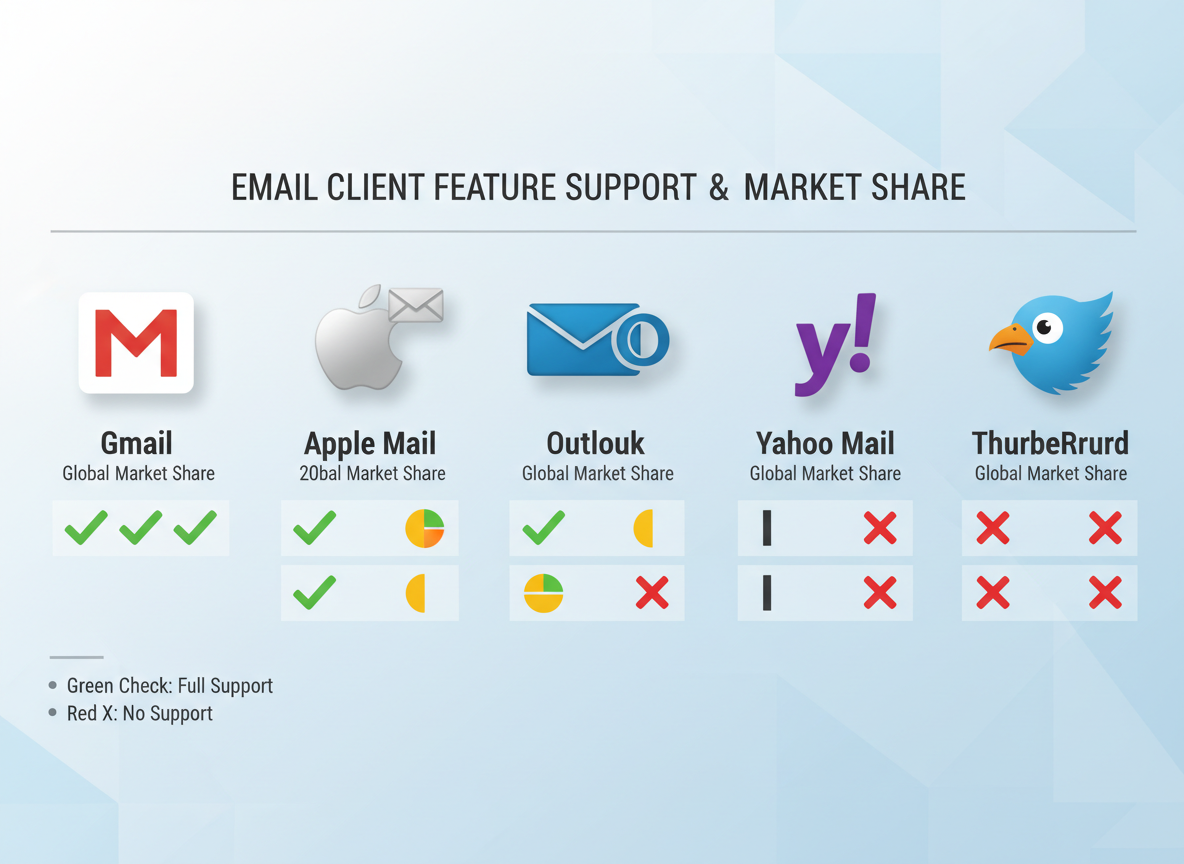
Here’s the harsh truth: email clients are a fragmented mess, and they’re not getting better anytime soon.
Gmail supports interactive CSS and some AMP features. Apple Mail handles CSS animations beautifully. Outlook? It still renders emails using Word’s ancient HTML engine. Yeah, you read that right—Word.
Mobile versus desktop creates another split. Your slick interactive carousel might work flawlessly on iPhone Mail but break completely in the Gmail Android app. Desktop Outlook users won’t see your CSS-powered accordion menu at all.
This is where progressive enhancement saves your campaign. Build email widgets with layers: a solid static image base, enhanced CSS interactions for clients that support them, and full interactivity for the modern email apps.
Your fallback strategy matters more than the fancy features. When that countdown timer fails in Outlook, show a compelling static version that drives the same urgency. Can’t render your product carousel? Display your bestselling item with a “View All” button instead.
Testing isn’t optional. Use Litmus or Email on Acid to preview across 90+ client combinations before sending. Check dark mode rendering too—those interactive elements need proper color contrast adjustments.
The best email widgets work everywhere because they’re designed to degrade gracefully. Plan for the worst-case scenario first, then enhance upward.
Design Best Practices for High-Converting Email Widgets
Your email widgets can be technically flawless but visually forgettable—and that’s a conversion killer.
Start with visual hierarchy that guides eyes exactly where you want them. Interactive elements should stand out without screaming for attention. Think size, spacing, and strategic use of whitespace to create natural focal points that draw subscribers toward action.
Button design matters more than most founders realize. Your CTAs within widgets need clear affordances—make them obviously clickable through depth, shadows, or subtle hover states. Stick with high-contrast color combinations that pass accessibility standards while aligning with your brand. Red and green buttons aren’t just clichés; they work because color psychology triggers specific responses.
Mobile-first isn’t optional anymore. Design your email widgets for thumbs first, desktops second. Interactive elements need minimum 44×44 pixel touch targets, and spacing between clickable items prevents frustrating mis-taps.
Loading states and micro-interactions separate amateur widgets from professional ones. Show users something’s happening when they click—even a simple animation or spinner prevents the “did that work?” confusion.
WCAG compliance isn’t just ethical; it’s smart business. Screen reader compatibility, keyboard navigation, and proper ARIA labels ensure everyone can engage with your content. When you’re inspiring clients to say yes, accessibility expands your persuasive reach.
Brand consistency matters, but don’t let it kill functionality. Your interactive elements can feel on-brand while still being unmistakably clickable.
Common Email Widget Implementation Errors and Solutions
Let’s fix what’s breaking your email widgets before they tank your campaign performance.
Rendering chaos happens because Outlook uses Word’s rendering engine (yes, really). Gmail strips out most JavaScript. Apple Mail does its own thing. Test across at least ten clients using Litmus or Email on Acid—not just your inbox.
Loading speed kills conversions. Compress images to under 100KB each. Use conditional loading for GIFs. Lazy load anything below the fold. Your widget shouldn’t take longer to load than your checkout page.
Broken interactions? Always build progressive enhancement into email widgets. If the interactive element fails, your fallback needs to work perfectly. A broken countdown timer becomes a static image with a clear CTA.
Analytics not tracking? Most issues stem from UTM parameters getting stripped. Double-encode your tracking pixels. Use image-based tracking as backup—email clients can’t block those.
Accessibility failures aren’t just compliance issues—they’re revenue losses. Add alt text everywhere. Use semantic HTML. Test with screen readers.
If you’re consistently hitting walls, it might signal deeper marketing execution problems worth investigating.
A/B Testing Strategies for Email Widgets
Testing email widgets isn’t like testing regular campaigns—you’re measuring interaction depth, not just opens and clicks.
Start with the fundamentals: widget type versus static content. Run one segment with your interactive calendar widget against a control group with standard booking links. You’ll see the difference fast.
Test placement ruthlessly. Above the fold versus mid-email. Before product descriptions versus after. Where you put that countdown timer widget matters more than you think.
Design variables deserve attention too. Button colors, widget sizes, animation speed—all impact engagement. But here’s what most founders miss: test copy variations within the widget itself. “Book your call” hits different than “Grab your spot.”
Sample size matters. Aim for at least 1,000 subscribers per variant for statistical relevance. Smaller list? Extend your testing window.
Track beyond clicks. Monitor completion rates, time-to-convert, and downstream revenue. Widget interaction doesn’t always mean immediate conversion—sometimes it’s building momentum.
Segment your tests by customer lifecycle stage. New subscribers interact differently than long-term customers. Your testing framework should reflect that reality, much like the strategic approach outlined in our marketing leadership habits resource.
Iterate weekly, not monthly. Winners become new controls. Losers teach you what not to repeat.
Privacy, GDPR, and Data Collection with Email Widgets
Here’s the truth: interactive email widgets collect data, and that means you’ve got compliance hoops to jump through.
GDPR requires explicit consent before collecting personal information through widgets. Your newsletter signup widget? That needs a clear opt-in checkbox—not pre-checked. Your quiz widget gathering email addresses? Same deal. The “legitimate interest” loophole won’t cut it here.
Different widget types demand different approaches. A simple poll widget that’s anonymous? You’re probably fine. But the moment you’re tracking individual responses or tying interactions to email addresses, you need documented consent.
Your privacy policy needs updating too. Spell out exactly what data your widgets collect, how long you’ll store it, and who processes it. If you’re using a third-party widget provider, that’s a data processor relationship requiring a DPA.
CCPA adds another layer for California contacts—they can request deletion of any data your widgets collected. Set up a process for that before you need it.
The smartest move? Build consent into the widget experience itself, not buried in fine print. Transparency builds trust, and trust converts better than trickery ever will.
Email Widget Costs: Budget Analysis for Scaling Businesses
Let’s talk money. Free widget options exist—think basic countdown timers or simple image carousels—but they’ll leave you wanting more functionality and branding control. You’ll hit their limits fast.
Mid-tier solutions ($50-500/month) offer solid value for growing businesses. These platforms typically include interactive elements, decent customization, and analytics. They’re perfect when you’re generating real revenue but aren’t ready for enterprise budgets.
Enterprise platforms start around $1,000/month and climb quickly. Custom development? Budget $5,000-25,000 for complex interactive widgets, depending on your requirements.
Here’s what nobody tells you about hidden costs: development time eats 10-20 hours monthly, testing across email clients doubles that during launches, and ongoing maintenance requires dedicated resources. Factor in opportunity cost when your team’s building widgets instead of strategy.
ROI calculation’s simple: track conversion lift from widget-enhanced emails versus plain versions. If your average customer value is $1,000 and widgets boost conversions by 2%, you’ve got clear math to work with.
Small businesses should start with proven mid-tier platforms before considering custom solutions. And if you’re unsure where to allocate your marketing budget, choosing the right AI marketing agency can help you prioritize investments that actually move the needle.
Automation and Email Widgets: The Always-On Advantage
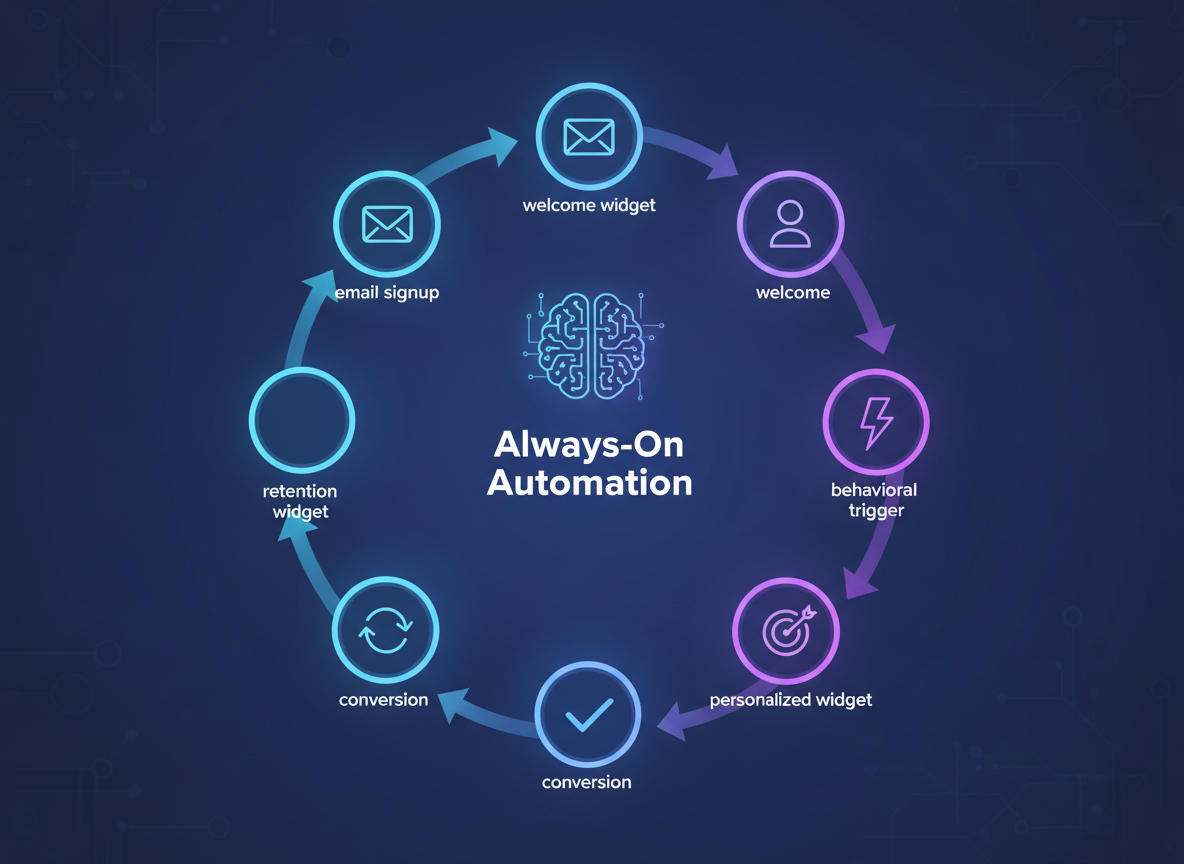
Here’s the truth: you can’t manually send personalized emails to thousands of people. But automated email widgets? They’ll work harder than your most caffeinated employee.
Triggered widget campaigns run on autopilot, deploying the right interactive element at the perfect moment. Someone abandons their cart? Send a widget-powered email with product recommendations that update based on real-time inventory. A customer hits a milestone? Trigger a personalized celebration widget with their specific achievement data.
The magic happens when you connect email widgets to your CRM and customer data platforms. Now you’re not just automating—you’re automating with intelligence. Your widgets pull live data, adjust content based on user behavior, and deliver experiences that feel handcrafted but scale infinitely.
In 2026, AI takes this even further. Modern widget platforms analyze behavioral patterns and predict which interactive elements will convert specific segments. Someone who always opens emails on mobile at 7 AM? They’ll get a different widget than the desktop user who clicks through on Wednesday afternoons.
Setting up these campaigns takes upfront work, but once they’re running, they convert while you sleep. Think of it like hiring a team that never clocks out, never complains, and consistently delivers personalized experiences.
Want to level up your entire marketing strategy? Check out the Best AI Marketing Agencies For 2026 to see how automation extends beyond email.
Future Trends: Where Email Widgets Are Headed in 2026 and Beyond
The email widget landscape is evolving faster than most marketers realize. AI-powered dynamic content generation is already transforming widgets from static elements into intelligent, self-optimizing components that adapt in real-time based on user behavior and preferences.
Voice-activated email interactions are emerging as the next frontier. Imagine recipients asking Siri to “add the blue sweater to cart” directly from your email. It’s coming sooner than you think, and early adopters will have a massive advantage.
AR and VR widget experiments are moving beyond novelty. Brands are testing virtual try-ons and 3D product visualizations embedded right in the inbox. Meanwhile, blockchain and Web3 integrations are opening possibilities for tokenized loyalty programs and verifiable scarcity—though we’re still in early days.
The real game-changer? Predictive personalization that anticipates needs before recipients articulate them. Just as AI search is rewriting visibility rules, AI is transforming email engagement.
To future-proof your widget strategy: start with progressive enhancement, test aggressively, and build flexibility into your infrastructure. The widgets you implement today should adapt to tomorrow’s capabilities without requiring a complete rebuild.
Frequently Asked Questions
Yes, but with limitations. Most email widgets display as static images or fallback content on mobile devices. Interactive features work best on desktop clients that support AMP or advanced HTML. Always design with mobile fallback in mind.
Product carousels and cart abandonment widgets consistently deliver the highest ROI. They let customers browse products and complete purchases without leaving their inbox, reducing friction in the buying process.
Not necessarily. Basic interactive elements using HTML can be free if you’ve got the skills. AMP email platforms typically charge based on email volume, starting around $50-200 monthly for small businesses. The real cost comes from testing and optimization time.
Test your emails across major clients using tools like Litmus or Email on Acid. Gmail supports AMP emails, while Apple Mail handles advanced HTML better. Most platforms provide detailed compatibility reports.
Heavy code or suspicious interactive elements might trigger spam filters. Stick to clean code, test thoroughly, and maintain good sender reputation. The bigger risk is poor user experience, not deliverability.
AMP requires Google approval and works primarily in Gmail, offering true interactivity like form submissions. Interactive HTML uses CSS tricks and works across more clients but can’t process real-time data. Think of productized approaches here—pick what works for your specific use case.
Basic HTML/CSS knowledge helps, but many email platforms now offer drag-and-drop widget builders. For advanced customization, you’ll want developer support.
Poorly coded widgets can slow loading, especially on mobile. Keep file sizes under 100KB and optimize images. Most well-built widgets add less than a second to load time.




Leave a Reply
Your email is safe with us.